Before You Purchase: a Checklist
- Confirm Method of Payment
- Determine if you will be paying via purchase order (PO) or procurement card (PCard)
- Check Agreements
- See if a UCR/UCOP contracted supplier exists.
- Verify Supplier
- Ensure the vendor is active in Oracle (if utilizing this payment method).
- Check for Additional Department Involvement
- Determine if IT, HR, or Facilities must be involved.
- Confirm Funding, Eligibility, and Pre‑Approvals
- Ensure budget availability and grant compliance (SSPR).
- Quote & Document Collection
- Gather required documentation/quotes.
- Submit Request
- Via Oracle or Service Now (access restrictions may apply).
Do not sign supplier quotes, agreements, or contracts.
Faculty and staff do not have the delegated authority to bind the university to these documents. Please submit such documents to Business Operations for authorized signature routing.
Receiving Details
Receiver: Joseph Viramontes (joseph.viramontes@ucr.edu)
Receiving Room: Boyce Hall 1415A
Hours: Monday - Friday, 8:00 - 5:00 PM
Contact: bmppurchasing@ucr.edu
Building | Delivery Code |
| Boyce Hall | UCR0123 - Biochemistry UCR0108 - Microbiology & Plant Pathology |
| Multidisciplinary Research Building (MRB) | UCR0158 - Microbiology & Plant Pathology |
| Fawcett Hall | UCR0187 - Microbiology & Plant Pathology |
| Genomics Building | UCR0060 - Microbiology & Plant Pathology |
| Geology Building | UCR0106 - Biochemistry |
| Northern California | UCR0003 - Kearney UCR0018 - Lindcove |
For more information, visit our Receiving Room & Mail Services page.
Oracle Guided Learning
Oracle Guided learning, also known as OGL, is an information and learning interface layered on top of the Oracle Financials and Budget applications. UCR will implement OGL for go-live to provide communications on new or essential information and provide system users with on-demand guidance tailored to meet UCR-specific processes.
Oracle Users will have access to the following:
- Step-by-step guides for major processes
- Help icons defining values and fields
- Resources and on-demand help within the application
WalkMe browser extension will need to be downloaded to your computer in order to access the guides. If you are on a device managed by ITS, WalkMe is already installed on your device! Read these Knowledge Base articles if you are having trouble accessing it.
Guidance for other users can be found below:
Users with Administrative Control of their device
campus it groups who manage their unit's devices
Note: If you are able to download and install applications on your device without help, this means you have administrative control over your device. You can install WalkMe onto your device yourself using the guidance here.

UCR Procurement Guidelines
-
UC Source Selection & Price Reasonableness (SSPR)
If the goods and/or services are Federally‐funded, the applicable Federal requirements must be followed in addition to standard state laws (PCC) and UC policy (including, but not limited to BUS‐43). Non‐Federally‐funded goods and services ≥ $100,000 must be purchased in compliance with the California Public Contract Code (PCC) and UC policies. The UC must use its own documented procurement procedures which reflect applicable State laws and regulations, provided that the procurements conform to applicable Federal law and standards. Mixed funds (both Federal and non‐ Federal) are subject to Federal and State requirements, but when in conflict, the more restrictive requirement governs.
The Source Selection & Price Reasonableness From can be found here.
-
Requesting New Suppliers/Vendors
UCR is moving to a Campus-wide Supplier Strategy This will increase UCRs ability to leverage spend and ability to better negotiate agreements due to consolidated spend.
What does this mean for you?
• Not all current UCR suppliers and Purchase Orders will be converted into the new Supplier Portal/Oracle Procurement module.
• A smaller supplier database is easier to manage and working with a smaller database presents a lower risk to the University.
• Improved efficiency in the procure to pay process, ability to develop strong standards with invoice submission and payment methods.
• New supplier portal and request process will be implemented in July 2023. -
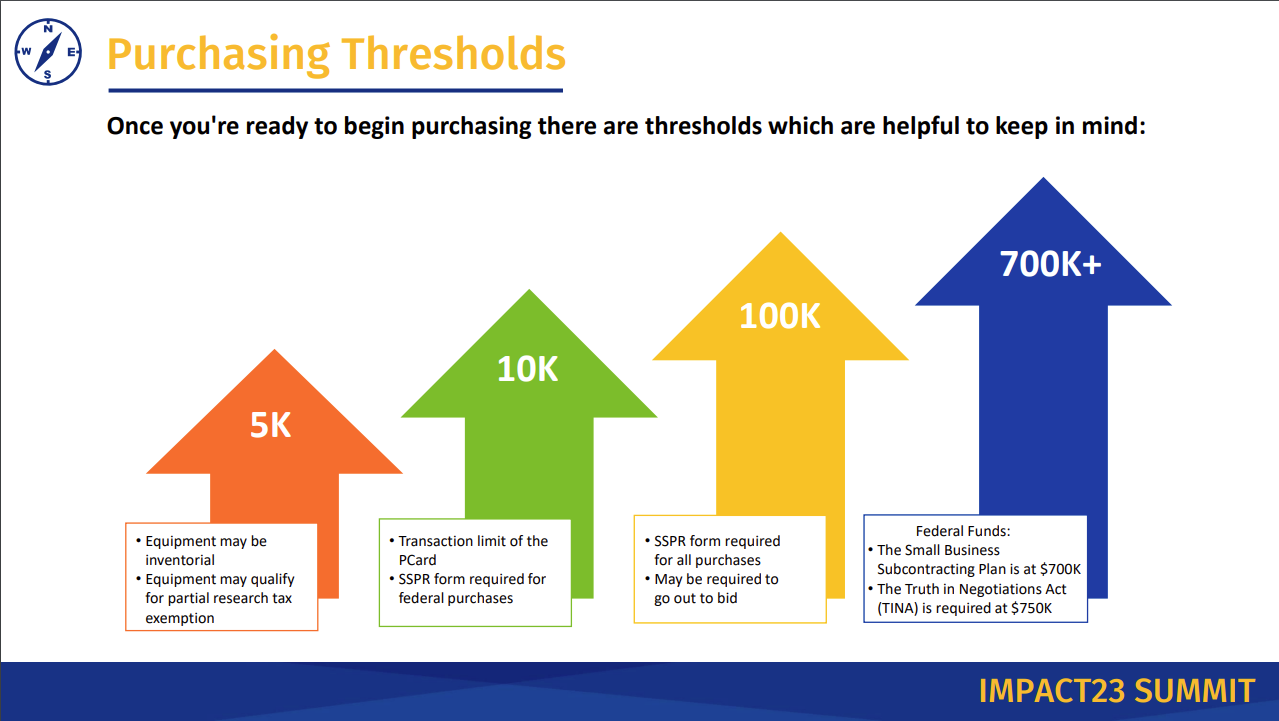
Purchasing Thresholds
BMP Procurement Policies
-
Purchase Order (PO) Processing Time
Orders placed Monday-Friday before 12:00 p.m. are typically reviewed by the procurement team and routed for Financial approval the within 24 hours. Financial approval processed within 24-48 hours, Dept approval within 1 business day. Orders can take 2-5 days max to be submitted to the vendor. If there are additional levels of approval could take longer. Contact BMP purchasing to escalate urgent orders (limited quantity or special pricing deadlines)
-
Always Request a Purchase Order First
Do not make purchase commitments for items or services with outside vendors without having a PO in place first. This is to protect your lab and the University – always run the requests through Oracle first or talk to the BMP Purchasing Office.
To purchase items from the campus store, please initiate an Oracle requisition with dollar amount not to exceed. We will give you a PO to go shop, return back to the admin office with the receipt.
-
Use UCR Approved Vendors
Normal purchasing processes (UCR approved Oracle vendors) are to be used FIRST. The vast majority of purchases can (and should) be routed through the BMP Purchasing Office. Please follow guidelines on the "Oracle Procurement" website for how to shop the Hosted catalog suppliers and Punch-out websites.
Obtaining multiple quotes is encouraged for non-standard items/services. Often vendors offer Higher Education and/or UC discounts. Main Purchasing will ask for quotes from multiple vendors on requisition submittals.
-
Emailing BMP Purchase Requests
All purchase requests must be initiated in Oracle by the end user. This includes publication charges & Membership fees. A PO should be in place prior to receiving an invoice.
-
Order Update/Tracking?
Please follow these protocols:
- Do your Due Diligence and come with relevant info to reference like a PO number, req number, order date
- Read your emails and look for confirmation of delivery and communicate with your lab personnel
- Contact your building Receiving Room Admin.
- Contact the Transactor that placed your order
-
Order Mistake, or Need Us to Cancel?
If you need to cancel an order, or need us to return the order back to your queue for you to update, email bmppurchasing@ucr.edu or the transactor listed in your PO.
Some vendors offer same day shipping, if items shipped before you contact us note that we will need to wait for the item to arrive, and then ship back. Additional fees may apply.
-
Equipment Repair
If you have equipment that is not working correctly and you require a diagnosis and/or repair, you are welcome to reach out to the vendor or the supplier directly if you have their contact information. After coordinating their visit, please submit an Oracle requisition for the service. Note: the requisition will need to be in place before their scheduled visit.
If you are not sure which repair companies to contact, or are not familiar with this process, please submit your request to the BMP Request For Equipment Repair Form on the BMP website.
For questions, please reach out to BMPpurchasing@ucr.edu.
Procurement Guidance
-
Procurement Process Map
Approval Process Map
The attached document will show you the approval process for purchases.
-
Requestion Status Definitions
The attached document will show you the list of purchase order statuses and their descriptions.
- Restricted Items
-
ODP Business Solutions (Office Depot)
ODP Business Solutions
ODP Business Solutions® (Office Depot) and UC Riverside have teamed up to provide great savings on shopping at https://www.officedepot.com ODP Business Solutions is your supplier of choice for all office supplies purchases, and cardholders can now pay via PCard - no billing, no POs!
Enjoy these great benefits:
* 360+ most frequently purchased items offered at deep discounts
* ODP brands are also available and ready to ship from this catalog
* No delivery fees or freight charges unless it is a specialized order
* Many orders can be delivered to campus the next business day (8:30-5:00 pm) if placed online by 3:00 pm.
The following information is required when submitting your requisition in Oracle for BMP to complete your purchase:
-
eBay Purchases Form
Please download/complete and sign the form and email it to bmppurchasing@ucr.edu as all eBay purchases need to have this form completed before purchase is made. This is required to avoid a conflict of interest.
- PCard & T&E Card Matrix
-
Accessing/Receiving Oracle Procurement
Only PI and 2 lab personnel (lab manager/primary requestor) will be provided access to the Oracle Procurement System.
Linked below are the (3) LMS required trainings required for submitting purchase requests. Lab personnel are required to take Oracle-Requestor training.
Access will be given once required trainings are completed and request form is submitted with certificates of completion uploaded.
Once completed, submit certificates to Oracle Access Request Form.
- Chart of Accounts & POETAF (FAUS)
- Golden Tree Viewer
Campus Business Services
-
Placing IDT, Ethanol, Gas Cylinders, and Lab Coat Laundering Orders
These goods and services may be procured through Receiving Services (formerly Campus Storehouse/ScotSupply).
Please go to UCR Work Order System Portal
- Click "Submit a Request"
- Select "Work Order System" from the drop-down menu
- Choose "Receiving Services Request"
- Choose from the following services in the "Receiving Service" drop-down menu and add your desired items. Please see additional ordering instructions for each request type:
- Ethyl alcohol
- Enter Room for delivery, or your building's central delivery location
- Only authorized approved custodians may request alcohol purchases
- Biochemistry - Joshua Halford, joshua.halford@ucr.edu
- Microbiology & Plant Pathology – Lab custodians are set up per lab – please contact BMP Purchasing, BMPpurchasing@ucr.edu for more information.
- Gas Cylinders/Specialty Gas Cylinders
- Gas cylinders will be delivered directly to your lab, so enter the correct building and room number
- If you have cylinders to return, list the # of tanks and their building/room locations in the "Additional Information" textbox in the "Delivery" section
- Label the tanks that are being returned, disconnect them from any hoses/apparatus, and ensure access to the tanks is not blocked, or they will not be picked up
- IDT Request
- If you to create an IDT account (with UCR pricing built in) see account creation and ordering instructions
- After your IDT request has been approved, you will receive an ORD number
- Enter the last 6 digits of the ORD number in the "Purchase Order Number" field when checking out on the IDT website
- Submit a new order request for each IDT order you need to submit - you CANNOT reuse ORD numbers
- Complete the rest of the sections on the form and submit
- If the COA won't populate in the respective field, provide in the "Additional Information" textbox at the bottom of the form
- If your PI won't populate in the respective field, enter "Tara Pastucha" instead
- Receiving Services is still adding COA/PI data to the program and estimate it will take a few more weeks before these fields are completely updated
- Ethyl alcohol
More information can be found directly on Receiving Services website.
-
Printing & Reprographics - Posters/Exams/Business Cards
All UCR business cards must be purchased through UCR’s Digital Print Services. Posters and exam requests can be submitted in PDF format with output specifics noted and require a minimum of 3 business days to print and will be delivered to the BMP office for pickup.
BMP Print Request Form -
Poster Printing Via External Vendor
For non-UCR P&R poster printing requests, where an established campus vendor is being utilized (E.g., Fedex, Postersmith, etc.) please submit a new requisition in Oracle Financials. Note that all requests should be submitted with 3-5 days advanced notice.
The requisition should include the following:
- The appropriate vendor should be selected from the Supplier field, from the options available.
- The Item Description, should include a description of the poster as well as the size of poster that is being ordered.
- A PDF copy of the poster should be added as an attachment to the requisition.
- An appropriate COA for the expense should be included for payment.
Note: Same-day poster printing with outside vendors is no longer available. If a paper poster is needed same-day, you may check with the Orbach Library to determine their availability to assist. Please see their website here: https://guides.lib.ucr.edu/plotter
-
Office and Lab Furniture
The University has exclusive contracts with vendors for office and lab furniture. Please do not purchase any office or lab furniture without discussing your plans first with the BMP Purchasing Office. If you buy a file cabinet, from Office Depot or some other local vendor, you will NOT be reimbursed.
ScotSurplus is a service unit on campus responsible for selling excess items, except for the 1st and 3rd Tuesdays of every month when they sell to the public. You can view or purchase items for sale by going to the UCR Corparation Yard, but you are encouraged to call, in advance, to ensure availability. You will need to bring an online recharge form with you when you go. Scott Surplus does not deliver.
Purchasing new or used furniture from non-contracted vendors requires approvals from the Campus Fire Marshal, Procurement, EH&S for lab furniture, and possibly a Campus Building Permit for modular furniture systems. Please talk with BMP Purchasing prior to shopping for furniture.
Oracle Tutorial
- Setting Up Requisition Preferences
- Chart of Accounts Tip Sheet
- Punchout Catalog Order
-
ProCard Order
The BMP Purchasing Office staff use University issued credit cards (Procards) for goods and vendors that cannot be processed with Purchase Orders. Pro-cards are to be used BEFORE using personal funds. Most often Pro-card purchases are used in instances where vendors are not established in Oracle or cannot agree to PO terms. Pro-card requests should be routed via Oracle (include vendor links such as Amazon etc & PDF.) – not emailed.
ProCard purchases now have $10k threshold for non UC Suppliers. Be sure to review- restricted items
- Adding PI to Workflow
- Creating a Requisition in Oracle
- Updating a Project (POETAF) on a Requisition
- Oracle Purchasing Categories List
- PCard Inventorial Equipment Guide